
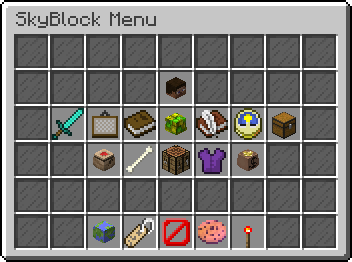
Custom GUIs with in-game action management for PocketMine-MP 5.x
version 1.0.0
Approved
Submitted on 13 Jul 2025 from Dev Build #2, Approved on 10 Aug 2025
A powerful and flexible custom GUI system for PocketMine-MP 5.x that allows server administrators to create interactive graphical user interfaces with various actions and customizations.
- In-game GUI Editor: Create and edit GUIs directly in-game with a visual grid interface
- Drag & Drop Interface: Intuitive 6x9 grid layout for easy item placement
- Real-time Preview: See your GUI changes instantly as you build
- Command Actions: Execute server commands when players click items
- Teleport Actions: Teleport players to specific coordinates
- GUI Navigation: Open other GUIs from within a GUI (nested navigation)
- Multiple Actions: Assign multiple actions to a single item slot
- Dynamic Lore: Add custom titles and descriptions to any item
- Interactive Hints: Show additional information on item hover
- Rich Text Support: Use color codes and formatting in lore text
- GUI Management Menu: Comprehensive in-game GUI management system
- Action Management: Add, edit, and remove actions from any slot
- Lore Management: Manage custom lore for items
- GUI Deletion: Safely remove unwanted GUIs
- Caching System: Server-wide and per-player GUI caching for optimal performance
- Database Support: SQLite and MySQL database support for data persistence
- Error Handling: Robust error handling with user-friendly messages
- Permission System: Granular permission control for different user roles
- PocketMine-MP: Version 5.0.0 or higher
- PHP: Version 8.0 or higher
- Database: SQLite (included) or MySQL (optional)
- Download the latest release from the releases page
- Extract the plugin files to your server's
pluginsfolder
The plugin includes all necessary libraries:
- InvMenu: For inventory menu functionality
- libasynql: For database operations
- pmforms: For form handling
- Start your server once to generate the configuration files
- Edit
plugins/Customgui/config.ymlto configure your database settings - Restart your server
Configure permissions in your permission plugin:
permissions:
  cg.use:
    description: "Allows use of /customgui command"
    default: true
  cg.admin:
    description: "Allows access to the GUI management menu"
default: op| Command | Permission | Description |
|---|---|---|
/customgui |
cg.use |
Opens the main GUI management menu |
/customgui <gui_name> |
cg.use |
Opens a specific GUI by name |
-
Access the Management Menu
/customgui -
Create a New GUI
- Select "Create GUI" from the main menu
- Enter a name for your GUI (e.g., "welcome_menu")
- Click "Submit"
-
Design Your GUI
- Use the 6x9 grid to place items
- Right-click to place items in slots
- Items will be saved automatically
-
Add Actions
- Click on an item slot to add actions
- Choose from Command, Teleport, or Open GUI actions
- Configure the action parameters
-
Add Custom Lore
- Add descriptive titles and descriptions to items
- Use color codes for formatting (e.g.,
§afor green)
Execute server commands when players click items.
type: command
command: "spawn"
Teleport players to specific coordinates.
type: teleport
x: 100.5
y: 64
z: 200.5
Open another GUI when players click items.
type: open_gui
gui_name: "shop_menu"The plugin supports both SQLite and MySQL databases:
database:
  type: sqlite
  sqlite:
    file: customgui.sqlite
worker-limit: 1database:
type: mysql
mysql:
host: 127.0.0.1
username: your_username
password: your_password
schema: your_database
worker-limit: 2GUIs are stored as JSON files in the plugin_data/customgui/guis/ directory. Each GUI has its own file with the structure:
{
  "0,0": {
    "nbt": "item_nbt_data",
    "action": {
      "type": "command",
      "command": "spawn"
    },
    "lore": {
      "title": "Spawn",
      "description": "Return to spawn"
    }
  }
}Create a welcome menu with navigation options:
-
Spawn Button
- Item: Compass
- Action: Teleport to spawn coordinates
- Lore: "§a§lSPAWN§r\n§7Click to return to spawn"

-
Shop Button
- Item: Emerald
- Action: Open GUI "shop_menu"
- Lore: "§a§lSHOP§r\n§7Click to open the shop"


Create an admin panel with management tools:
-
Player Management
- Item: Player Head
- Action: Open GUI "player_management"
- Lore: "§c§lPLAYER MANAGEMENT§r\n§7Manage players and permissions"
-
Server Control
- Item: Redstone
- Action: Command "server status"
- Lore: "§c§lSERVER CONTROL§r\n§7View server status and controls"
Create complex menu systems with multiple levels:
- Main Menu → Category Menu → Item Menu
- Each level can have its own actions and navigation
Assign multiple actions to a single item:
{
  "action": [
    {
      "type": "command",
      "command": "spawn"
    },
    {
      "type": "teleport",
      "x": 100,
      "y": 64,
      "z": 200
    }
  ]
}- GUIs automatically reload when files are modified
- Cache system ensures optimal performance
- Real-time updates without server restarts


 @NetherByte233